 Signs & Large Format Print
Vector vs bitmap – the difference in practice
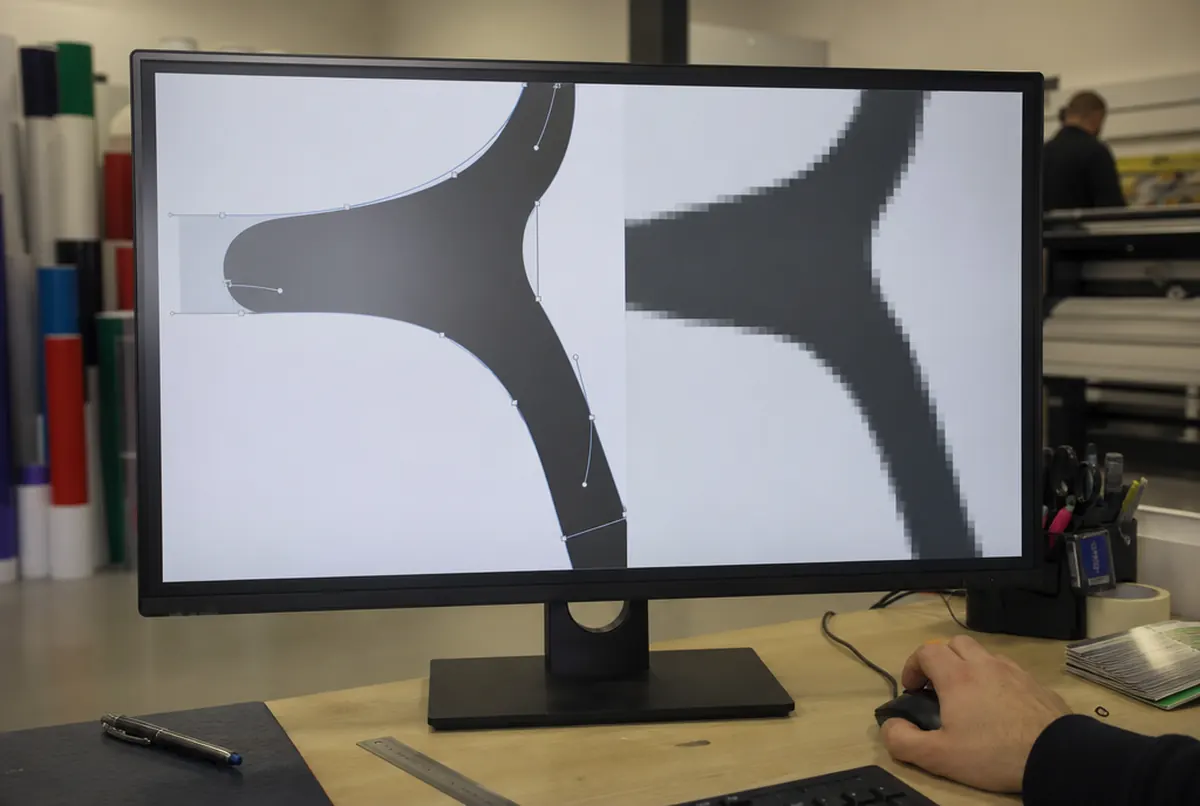
A bitmap (JPG, PNG, GIF, most photos) is a grid of coloured squares, i.e. pixels. There is a finite number of them. When you enlarge it, the pixels simply get bigger – edges become stepped and thin lines blurred.
A vector describes shapes with mathematical curves: 'an arc from here to there, filled with such-and-such a colour'. The software redraws those curves at every size, so the logo is just as sharp on a business card as on a building facade.
Let us take an example. A logo from a website is 500 pixels wide. On a 3 m wide banner (approx. 118 inches) that gives just over 4 pixels per inch. Even a banner seen from a few metres needs several dozen pixels per inch for the edges to look smooth; details in our guide to resolution for large format printing. That cannot be 'boosted' in software. The logo can only be redrawn.
When a vector is essential, and when it is just recommended
| Product | Vector | Why |
|---|---|---|
| Cut vinyl letters and lettering | essential | the plotter's blade follows the curves |
| Contour-cut stickers | essential | the cut line must be a vector path |
| 3D letters, 3D logos, light boxes with routed faces | essential | CNC routers and 3D printers work from contours |
| Laser engraving and cutting | essential | the laser follows a path |
| Print on merchandise and clothing | strongly recommended | one- or two-colour print needs clean, sharp shapes |
| Printed banners, boards, signs | recommended | a logo enlarged to several metres has to be sharp |
| Flyers, business cards, posters | recommended | small formats are more forgiving, but text and fine lines come out better |
For full-colour print (banner, poster) a very high-resolution logo is sometimes enough. For anything that is cut (vinyl, acrylic, dibond, foam) we cannot start without a vector. The machine does not 'see' coloured pixels; it needs a line for the tool to follow.
How to check whether you have a vector
The file extension is a clue, but not proof. The rules in brief:
- AI, EPS, SVG, CDR – usually vector, although someone may have pasted an ordinary image inside.
- PDF – may be a vector, or a bitmap saved as a PDF. The most common trap: someone took a screenshot of the logo and 'saved it as PDF'.
- JPG, PNG, GIF, WEBP, BMP – always bitmap. Renaming the file to .ai changes nothing.
- DOC, PPT – a logo pasted into Word or PowerPoint is almost always a bitmap.
A simple test: open the PDF in a browser or reader and zoom the logo to 800–1600%. If the edges stay perfectly smooth, it is a vector. If you see steps and blurring, it is a bitmap. A second test: try selecting the text in the logo. If it selects as text, the font has not been converted to outlines and may be substituted on another computer. We catch these things during file checking, but it is better to send a version with text converted to outlines from the start.
- 01Brief
Description, sizes, site photos and deadline — a few sentences are enough.
- 02Design and quote
Our designers prepare artwork or a visualisation and you get a price.
- 03Approval
You approve the design; for brand colours we provide a proof.
- 04Production
35+ machines in our own plant in Poland: 3.2 m UV print, CNC, laser, 3D, sewing.
- 05Installation or delivery
Own crews and vehicles across Europe, partner network, couriers worldwide.
Where to get a vector logo
- Ask whoever designed the logo. The designer or agency that created it should have the source files. Ask for 'the logo outlined, in AI, EPS or PDF format, in a colour and a one-colour version'.
- Look through old orders. Print files for business cards or letterheads from a previous printer very often contain a vector logo. Just send us that PDF.
- Check your brand guidelines. If the company has brand guidelines, logo files are usually supplied with them.
- Have it vectorised. If none of the above works, we redraw the logo by hand from the best bitmap you have. It costs approx. €26 net, and the result is ready for routing, plotter cutting and print at any scale.
We do not recommend automatic 'trace' functions in design software or online services. With a simple one-colour mark it sometimes works, but usually you get curves with hundreds of points, rounded corners and letters that 'wobble'. That might pass for a printed banner, but not for routing 3D letters.
- 24 hexpress printing (UV inks need no drying)
- approx. 3 daysstandard lead time
- up to 14 dayslarge and custom projects with installation
Plus courier delivery. Tell us your date — we plan production around it.
Vectors, colours and fonts
A good vector file contains not just the shape, but a defined colour too. If your company has a Pantone colour, have it saved in the file – then the shade stays consistent across repeat orders. More on this in our guide brand colour in print.
A logo with shadows, gradients and a 3D effect can also be a vector, but for vinyl cutting or routing you still need a simplified version – flat, in one or two colours. It is worth having both versions from the start. For dimensional letters or a light box it is the flat version that decides how the result will look – how they are made is described on the 3D letters and dimensional logos page.